
Record an in-game spot
Select a grenade and use Record to save the map, your position, and current angle. Give each spot a name and throw technique. Markers help you identify recorded positions.
Grenade Helper saves the map, position, angle, and grenade for each spot. Review the included examples and keep your own lineups organized by map.
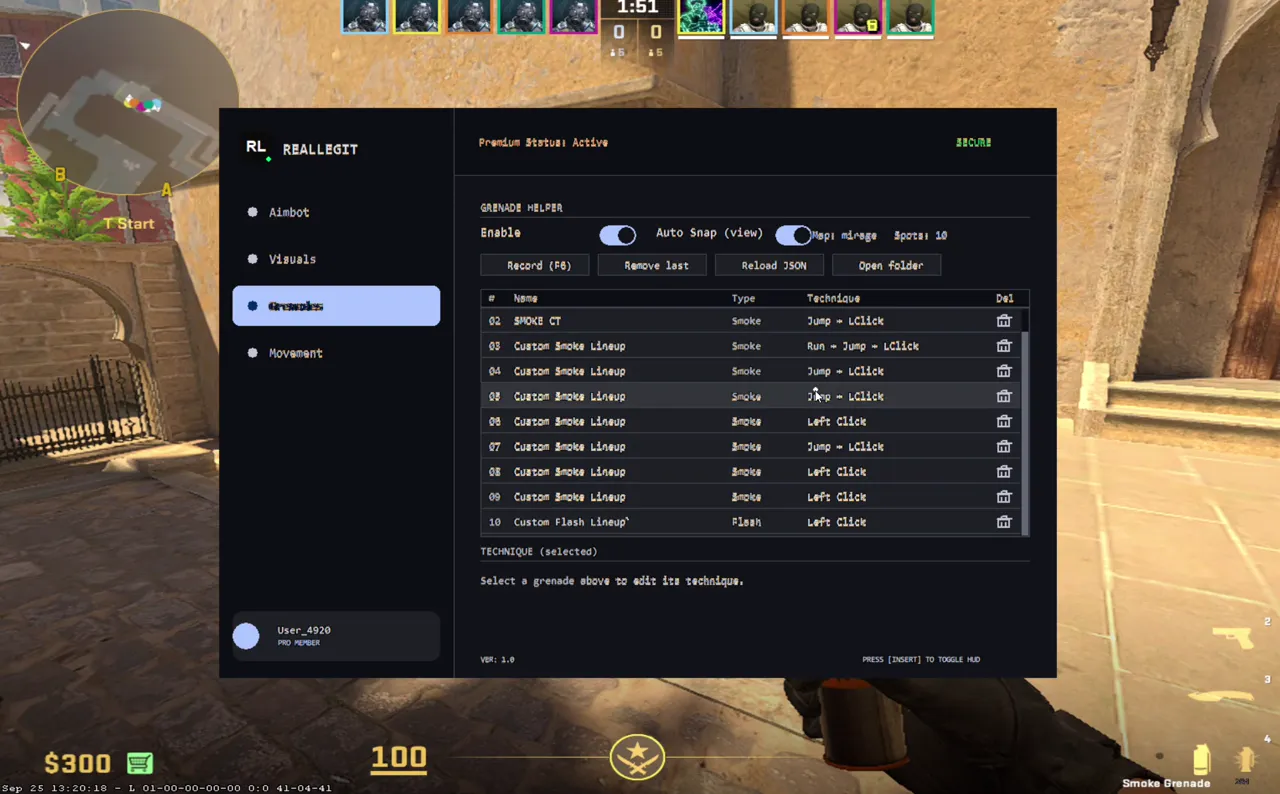
Select a grenade and use Record to save the map, your position, and current angle. Give each spot a name and throw technique. Markers help you identify recorded positions.
Stand on the spot and align your crosshair with its marker. Once position and angle stay correct briefly, the app performs the configured technique once. You align the crosshair yourself.
Each spot can use None, Left Click, Jump Throw, Run Throw, Run + Jump, or Walk Throw. Use Reload JSON to reload the file, Remove last to delete the latest record, and Open folder to open its data directory.
The current package includes saved spots for Anubis, Dust2, Cache, and Mirage. Names and data are editable examples shipped in the lineup file; verify each spot in the current map version before using it.
| Map | Smoke | Molotov | Flash | Total |
|---|---|---|---|---|
| Anubis | 4 | 2 | 2 | 8 |
| Dust2 | 4 | 0 | 0 | 4 |
| Cache | 6 | 3 | 1 | 10 |
| Mirage | 9 | 0 | 1 | 10 |
Counts reflect records bundled with the client. Spots can be edited; names and coordinates do not guarantee a competitive lineup or validity after map changes.
The distributed file contains records for Anubis, Dust2, Cache, and Mirage.
You position yourself and align the crosshair with the marker. Once alignment holds, the app performs that spot’s configured technique once.
Yes. You can reload the JSON from the menu and open the data folder with the Open folder control.